
📝Summary
Building conversational voice applications requires moving past standard cloud text wrappers to avoid jarring response delays. This blog explains how experts construct a high-concurrency FreeSWITCH WebRTC AI voice agent from scratch.
When you move a conversational AI pipeline from a text window to a live browser connection, your architectural challenges change instantly. Users who do not mind a loading spinner on a chat interface will abandon a phone call the moment they experience more than a brief lag.
If your automated voice bot takes upwards of a second to respond, the structure of a natural conversation falls apart. Callers assume the line went dead, begin talking over the system, and eventually hang up out of sheer frustration.
Achieving a conversational speed that matches human cadence requires an optimized media layer that can bridge web browsers to your AI models with zero processing overhead. This is why enterprise platforms avoid basic API wrappers and choose a FreeSWITCH architecture instead. FreeSWITCH operates on a thread-isolated, multi-threaded engine where every call gets its own protected memory space. This way, developers can manage raw media streams down to the millisecond.
The Architecture of a WebRTC AI Voice Agent on FreeSWITCH
A WebRTC AI voice agent on FreeSWITCH connects browser media endpoints to custom AI orchestration layers using native media bugs, streaming real-time audio chunking over WebSockets to optimize bidirectional data delivery.
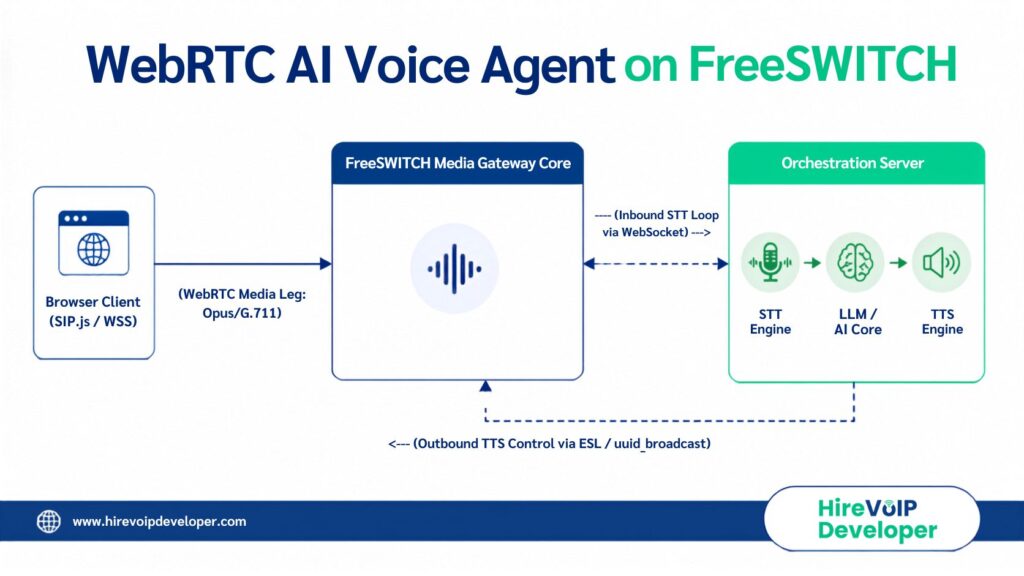
To establish a production-grade FreeSWITCH voice AI stack, your infrastructure must route the signaling paths cleanly through explicit pipeline layers:
- The Ingress Gateway Layer: A browser connection uses signaling libraries like SIP.js or mod_verto to send an encrypted WebRTC media stream over secure WebSockets (WSS) to FreeSWITCH. FreeSWITCH handles the complex encryption handshakes, terminates the WebRTC session, and extracts the raw audio packets.
- The Audio Forking Pipe: A non-blocking media wrapper forks the incoming audio leg, resampling the stream to 16kHz Linear PCM before piping it out over a persistent connection to your processing application.
- The Orchestration Layer: An external service accepts the audio feed, streams it directly to your Speech-to-Text (STT) provider, sends the resulting text to an LLM engine, and forwards the generated tokens to a Text-to-Speech (TTS) synthesizer.
- The Playback Pipeline: The orchestration middleware utilizes the FreeSWITCH Event Socket Layer (ESL) to dynamically inject the synthesized audio back into the active channel leg.
How to Construct the WebRTC Path to FreeSWITCH Voice AI?
How do you cleanly feed a browser call into your telephony core without introducing transcoding delays? Most standard tutorials focus purely on traditional SIP or softphones, leaving out the reality of a web application caller.
To get a real browser endpoint talking directly to your FreeSWITCH AI agent, you need to build a resilient path using either a signaling library like SIP.js over secure WebSockets (WSS) or FreeSWITCH’s native communication protocols.
When a user triggers a call on your web application, the browser negotiates a WebRTC session with FreeSWITCH. FreeSWITCH serves as your edge media gateway, terminating incoming Secure Real-time Transport Protocol (SRTP) packets and converting their payloads.
A key performance decision here is choosing the correct codec. While the Opus codec dynamically adapts to varying consumer network quality, running continuous transcoding loops on your media gateway can consume your server’s CPU. To streamline this process, enforce native 16kHz audio mapping across your channels.
This format mirrors what modern AI engines expect, saving you precious processing milliseconds per conversational turn.
Avoiding the mod_audio_stream Licensing Trap to Stream Audio Safely
Once your WebRTC signaling leg is established, you need to extract the live audio frames from the telephony engine and pass them to your data layer. Many development teams choose mod_audio_stream to handle this step, but doing so without checking your software version introduces a major infrastructure pitfall.
If you pull version v1.0.3 from common commercial distribution channels, your application will hit a hardcoded ceiling of 10 concurrent channels. Running this version in production will trigger silent routing failures the moment your concurrent call traffic spikes past 10 lines. To build an AI voice agent with FreeSWITCH frameworks that can scale to enterprise levels, you must explicitly build from the community version v1.0.0 (which uses open static libraries to deliver unthrottled concurrent channels without licensing locks).
To keep your communication core fully responsive under high traffic, you must separate your real-time processing streams into two decoupled pipelines:
1. The Inbound Audio Path (Speech-to-Text)
Your application taps the channel media bug using the community version of mod_audio_stream. It captures the raw binary audio frames from the caller, bundles them into low-overhead 20ms chunks, and streams them over a persistent outbound WebSocket to your orchestration middleware.
2. The Outbound Audio Path (Text-to-Speech)
Never attempt to stream synthesized agent audio backward through that same incoming WebSocket connection, as this path introduces severe packet sequencing bugs. Instead, connect your custom orchestration backend to FreeSWITCH’s native Event Socket Layer (ESL) via port 8021.
When your AI core finishes generating a speech response segment, your middleware should write the segment as a localized audio file and fire a non-blocking uuid_broadcast command over ESL. FreeSWITCH’s core engine takes over the playout natively, entirely avoiding processing bottlenecks.
💡 Expert Tip
Never run heavy application logic or synchronous API polling inside your core XML dialplans or embedded scripts.
Configure your inbound extension contexts to trigger a non-blocking socket application.
This strategy offloads the live call leg entirely to an external middleware service (built in Go or Node.js), keeping your core FreeSWITCH chassis dedicated exclusively to processing high-performance RTP media packets.
How to Design Instant Barge-In and Natural Turn-Taking for AI Voice Agent?
True conversational flow depends heavily on how your system handles user interruptions and conversational turn-taking. If a caller begins speaking while your bot is reading a response, an advanced AI voicebot would instantly mute the playback and listen.
If your platform relies purely on a distant cloud transcription API to detect that a customer has started talking, the agent will keep speaking for several syllables after being interrupted. To fix this, you must deploy a highly responsive Voice Activity Detection (VAD) layer locally on your orchestration middleware. The exact millisecond your local VAD registers an incoming audio signal from the caller, it must send an immediate command back to FreeSWITCH via ESL to clear the current output stream:
!-- Example non-blocking dialplan extension context --

< extension name="webrtc_ai_ingress" >
 &< condition field="destination_number" expression="^ai_voice_bot$">
< action application="answer"/ >
< action application="set" data="playback_delimiter=!" / >
< action application="socket" data="127.0.0.1:8084 async"/ >
< /condition >
< /extension >
When an interruption fires, your control application must issue a uuid_break command over the active channel leg. This purges your text-to-speech playout buffers instantly, muting the bot mid-syllable and allowing the user to speak without an overlapping audio track.
If your team is hitting obstacles syncing voice detection triggers with core switching logic, our FreeSWITCH developers can help integrate tailored routing components in your custom AI telephony solutions!
Self-Hosted AI Platforms vs. Turnkey AI Platforms
When deciding whether to build an AI voice agent with FreeSWITCH or outsource your orchestration to a commercial turnkey platform API, you must weigh short-term convenience against long-term operational costs and architectural freedom.
While third-party API platforms let you deploy a basic voice loop quickly, they act as a complete black box, preventing you from modifying low-level channel variables or adjusting codec behaviors. For scaling enterprise networks, a comparative structural matrix highlights why engineering teams choose to build on an open-source core:
For early pilots or quick MVPs, commercial wrapper models make sense to test user engagement. However, as soon as your platform handles significant daily call volumes, the markup costs scale unsustainably. Building your own engine on FreeSWITCH completely eliminates the platform tax, letting you run high-volume operations at raw compute cost.
FreeSWITCH Voice AI Production Hardening for Scale & Data Privacy
So, how do you prepare a working real-time voice pilot for enterprise-grade data privacy and massive concurrency? If you are deploying solutions for highly regulated fields like banking, insurance, or healthcare, sending raw user audio across public cloud endpoints is an immediate data compliance liability.
To achieve total data security, you can containerize your entire FreesSWITCH voice AI stack within a private cloud network. By running local instance models (such as a fine-tuned Whisper model for speech-to-text and specialized open-source engines for text-to-speech), your customer’s voice frames never leave your physical infrastructure boundary, ensuring perfect alignment with strict compliance frameworks.
And for scaling your concurrent capacities:
- Separate your edge proxies from your processing clusters.
- Deploy a cluster of stateless load balancers (like Kamailio) at your network edge to handle the incoming WebRTC handshakes.
This helps route the media tracks evenly to a dynamic pool of containerized FreeSWITCH instances. It also ensures your system remains responsive, self-healing, and fully capable of maintaining sub-600ms conversational cadence (across thousands of simultaneous connections).
Running an AI voice agent at true human speed requires more than a basic cloud API connection. It comes down to how tightly you control your raw media paths and protect your system from thread starvation.
FreeSWITCH gives you the exact low-level tools to shave off those critical milliseconds. When you combine clean media forking with an external event socket architecture, you protect your uptime and keep your conversations fluid.
If your team is currently hitting a wall with audio lag, websocket dropouts, or concurrent scaling bugs, our team can help! We specialize in designing carrier-grade, open-source telecom architectures that handle live traffic transitions seamlessly.
Connect with our open-source voice architects today to build your low-latency voice stack!
FAQs